You have chosen the wall, the pixel pitch, and the size. Then your integrator mentions the processor, and the quote jumps by several thousand dollars. It is easy to treat it as a minor box behind the rack. It is not.
An LED video processor for home theater use is the brain between your sources and your wall. It decides how every image is scaled, shaped, switched, and displayed. This guide explains what it does, how it differs from the controller inside the wall, what it costs, and what to ask before you buy.
Quick Answer
An LED video processor is the brain between your sources and the wall. It scales each source to the wall’s pixels, manages aspect ratios, switches inputs, handles HDR, and runs multi-view layouts. Budget about 2,000–8,000+. Without a good one, even a great MicroLED wall can look soft, mismatched, or hard to use.
An LED video processor is the hardware that takes video from your sources and prepares it for the wall. Your sources include a streaming box, a game console, a media server, and a cable box. The processor receives each signal, adjusts it, and sends it to the LED modules.
A TV does this work internally, so you never see it. An LED wall is built from modules and has no fixed shape or pixel count, so the job becomes a separate, important piece of the system.
Here are its main jobs:
| Function | What it does | Why you care |
| Scaling | Matches each source to the wall’s pixel grid | Keeps images sharp, not soft or stretched |
| Aspect-ratio management | Places 16:9, 21:9, or other formats correctly | Removes black bars and distortion |
| Source switching | Moves between inputs cleanly | No flicker or blank screens |
| Multi-view | Shows several sources on one wall | Sports, gaming, and video calls together |
| HDR and color handling | Maps brightness and color for the wall | Natural, punchy images |
| Refresh rate and latency | Keeps motion smooth and responsive | Better sports and gaming |
A wall’s pixel count depends on its size and pixel pitch, and it rarely equals a standard video resolution. Take a 130-inch 16:9 wall at 0.9 mm pitch. It has about 3,200 × 1,800 pixels. A 4K source is 3,840 × 2,160. The processor must scale that source down by about 17% so it fits. A 1080p source must scale up by about 1.7 times.
Good scaling keeps edges clean and detail intact. Poor scaling makes text and fine lines look rough. This is one of the biggest reasons processor quality matters. Our guide to the best pixel pitch for home theater explains how pitch and size set a wall’s pixel grid.
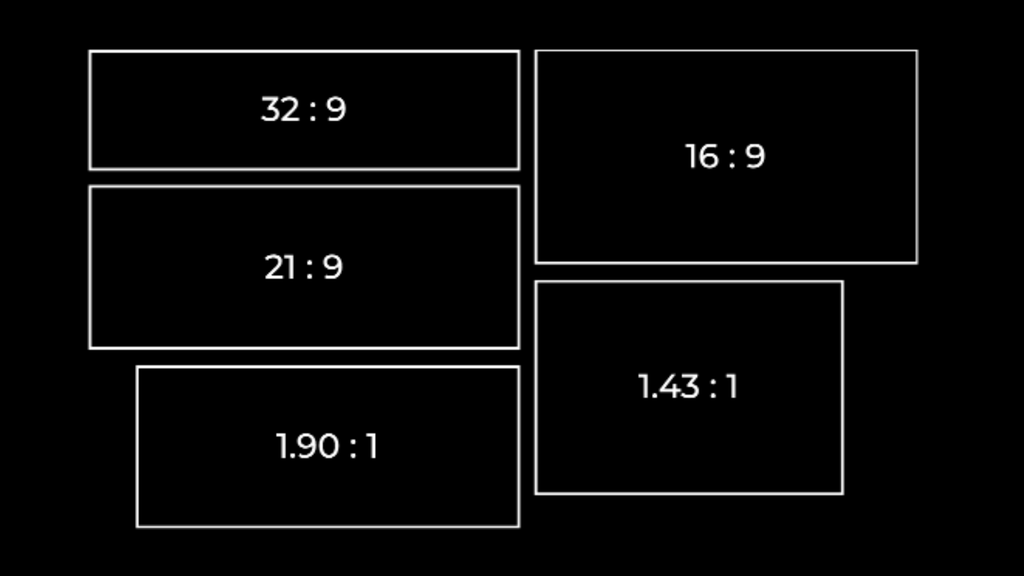
The processor decides where the image sits on the wall and how large it appears. A 21:9 film can fill a wide wall, while a 16:9 stream can sit centered at the right size. On a multi-format display, this happens automatically for each source. Read more in our guide to multi-format displays.
Processors switch between inputs without a flicker or blank screen. They can also split the wall into layouts. A 32:9 canvas equals two 16:9 images side by side, so you can watch two games, or a game next to a stats feed. This multi-view ability is a major reason to choose a wall over a standard TV.
HDR content carries brightness and color information that must be mapped to your wall’s capabilities. The processor handles that mapping, along with color and gamma. Ask which HDR formats the system accepts, because support varies between products. Brightness matters here too, and our guide to LED wall brightness in nits shows how to set it for your room.
Yes. Every processing step adds a small delay, called latency. For movies it does not matter. For fast games, it does. Ask for the system’s latency figure and whether it offers a low-latency game mode. Also check the supported refresh rates for your console or PC.
An LED wall also has internal control hardware. In many systems, a controller (often called a sending card) sends data to receiving cards inside the cabinets, which drive the LEDs. That hardware makes the modules light up correctly.
The video processor sits earlier in the chain. It prepares the picture. Some products combine both jobs in one unit, and some systems separate them. Ask your integrator which approach your system uses, and who configures each part.
For a premium residential wall, budget approximately 2,000–8,000+ for the processor, depending on the system. In a typical 150–165-inch project, the processor often falls in the 2,000–6,000 range inside a total budget of roughly 35,000–70,000+.
Several things push the price up:
Our guide to MicroLED video wall cost shows how the processor fits into the full budget with structure, installation, and calibration.
A processor that accepts control commands lets the wall join your smart home. Many processors support network or serial control, so your automation system can talk to them. The result is one-touch scenes. For example, a “Movie Mode” command can:
Integration typically adds about 1,000–5,000+ to a project, depending on the platform and scope. Confirm early that your chosen processor works with your control system.
SERA is IYO LED’s multi-format MicroLED system, built around multi-format and multi-source viewing instead of treating the wall as a fixed 16:9 television. It can be configured for 16:9, 21:9, 1.90:1, 1.43:1, and 32:9, with COB MicroLED technology, HDR processing, and modular installation.
Processing is a big part of how those formats and sources come together. For installation, our beginner’s guide to putting up an LED wall covers the basic steps, including processor and firmware configuration, and the CEDIA association can help you find residential integrators. If your project needs fully custom dimensions or 4K, 6K, and 8K resolution, look at Alinor.
Use this checklist when you compare quotes:
New to LED walls? Start with our complete guide to LED walls.
It takes video from your sources and prepares it for the wall. It scales each signal to the wall’s pixels, manages aspect ratios, switches inputs, handles HDR and color, and runs multi-view layouts.
For most home theater walls, yes. A wall has no built-in TV electronics, so a processor is what makes sources look sharp, correctly shaped, and easy to switch.
Budget approximately 2,000–8,000+ for a premium residential wall, depending on inputs, multi-view features, HDR handling, and wall resolution. In a typical 150–165-inch project, it often falls around 2,000–6,000.
It can. Processing adds latency, which matters for fast games. Ask about the system’s latency and whether it has a low-latency game mode, and confirm the supported refresh rates.
Many processors support network or serial control, which lets smart-home systems send commands. Confirm compatibility with your chosen platform before you buy.
The wall gets the attention, but the processor decides how every source looks and behaves. A good one keeps images sharp, shapes each format correctly, switches cleanly, and ties the wall into your home. Plan for it as a core part of the system, not an afterthought.
Ready to design the full system? Explore SERA and Alinor, then contact IYO LED for a custom MicroLED quote. Tell us your sources and your room, and we will help you plan the processing.